Parallel Redundancy Protocol (PRP)
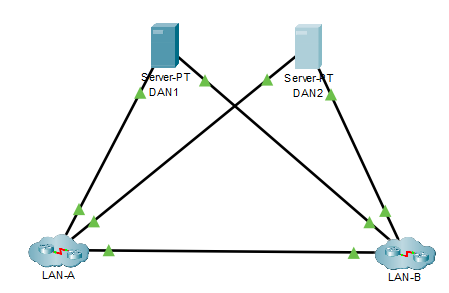
PRP uses the end nodes to implement redundancy, instead of network elements, by connecting two network interfaces to two independent, disjointed, parallel networks (LAN-A and LAN-B). These end nodes are Dual Attached Node (DAN). PRP is a layer 2 protocol.
How PRP Works:
A simple network topology with DANs
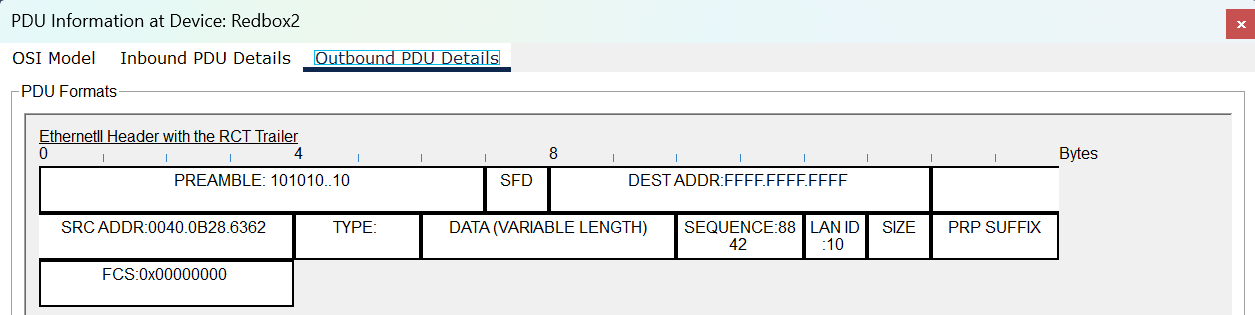
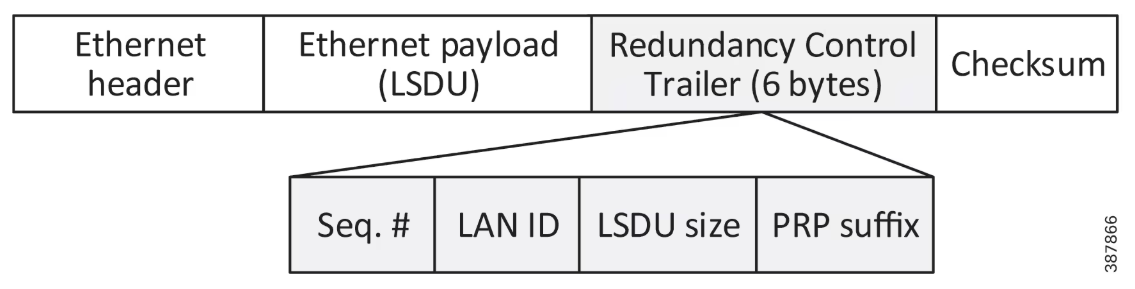
Redundancy Control Trailer (RCT)
Ethernet Frame with an RCT insert:

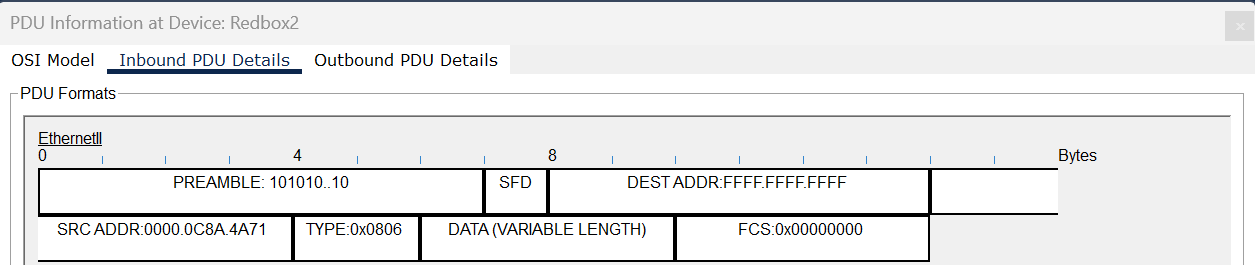
Example of an RCT added to the Ethernet Frame in Packet Tracer:
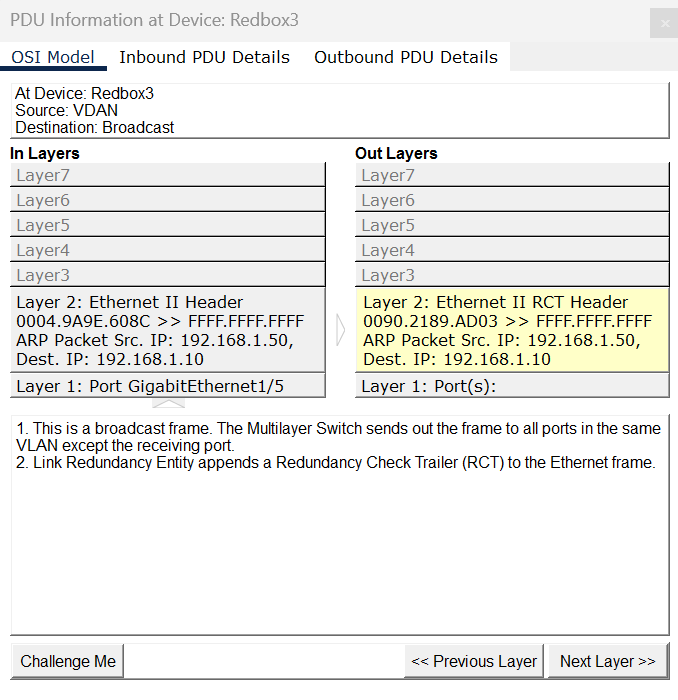
Incomping frame:

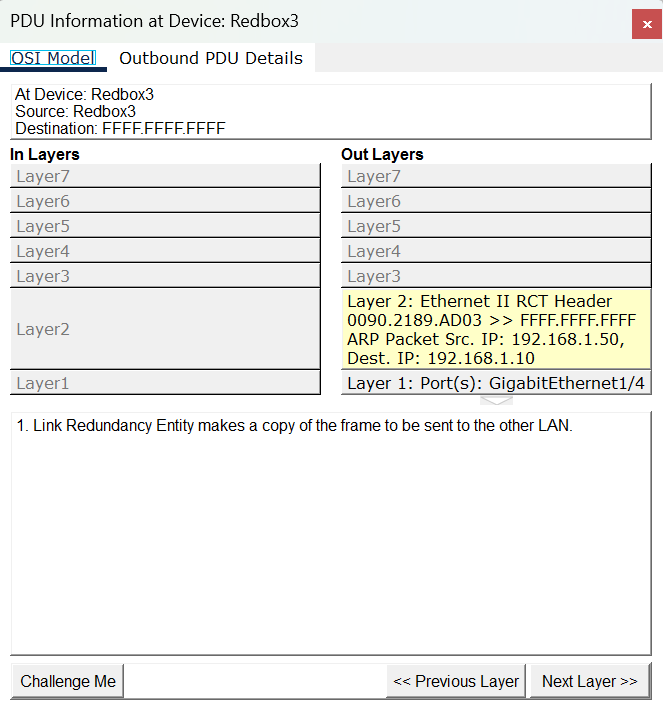
Outgoing frame with an RCT:

RedBox (Redundancy Box)
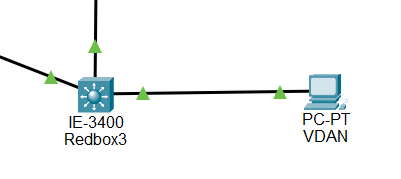
When an end node that does not have two network ports to implement redundancy in PRP, such an end node can connect to a RedBox (Redundancy Box), which provides connectivity to the two different networks on behalf of the device. The end node is called a VDAN (Virtual DAN), which is behind a Redbox.

Example of how a RexBox duplicates an ARP picket to send out to its two connected network

PRP added an RCT to its orignal packet and replicates another packet:

PRP Command Configuration in Packet Tracer
| Commands | Description |
|---|---|
| Verifying Configuration | |
| Switch#show interface prp-channel {1|2} detail | Displays configuration details for a specified PRP channel |
| Switch#show interface prp-channel detail | Displays configuration details for all PRP channels |
| Switch#show prp node-table | Displays PRP node table |
| Switch#show prp vdan-table | Displays PRP VDAN table |
| Creating and Disabling the PRP Channel and Group in Range | |
| Switch(config)#interface range {GigabitEthernet1/1-2 | GigabitEthernet1/3-4 } | Assign two Gigabit Ethernet interfaces to the PRP channel group |
| Switch(config-if)#[no] prp-channel-group prp-channel group | Enter sub-interface mode and create a PRP channel group |
| Configure or Disabling the PRP Channel Interface | |
| Switch(config)#[no] interface prp-channel prp-channel-number | Specify the PRP interface and enter interface mode. Configure vlan and mode (e.g. switchport access vlan 81, switchport mode access) |
Layer 2 PRP Configuration at RedBox (IE-9320)
On the IE9300
Switch(config)#interface prp-channel 1
Switch(config-if)#spanning-tree bpdufilter enable
Switch(config)#interface range gig 1/0/21-22
Switch(config-if-range)#prp-channel-group 1
!
interface PRP-channel 1
spanning-tree bpdufilter enable
!
interface GigabitEthernet1/0/21
prp-channel-group 1
!
interface GigabitEthernet1/0/22
prp-channel-group 1
!
Layer 2 PRP Configuration at RedBox (IE-3400)
On the IE3400:
Switch(config)#interface prp-channel 1
Switch(config-if)#spanning-tree bpdufilter enable
Switch(config)#interface range gig 1/3-4
Switch(config-if-range)#prp-channel-group 1
!
interface PRP-channel 1
spanning-tree bpdufilter enable
!
interface GigabitEthernet1/3
prp-channel-group 1
!
interface GigabitEthernet1/4
prp-channel-group 1
!
Layer 2 - VLAN PRP Configuration at RedBox
!
interface PRP-channel 1
spanning-tree bpdufilter enable
!
interface GigabitEthernet1/0/21
switchport access vlan 20
switchport mode access
prp-channel-group 1
!
interface GigabitEthernet1/0/22
switchport access vlan 20
switchport mode access
prp-channel-group 1
!
Layer 3 PRP Configuration at RedBox
!
interface PRP-channel 1
ip address 192.168.2.2 255.255.255.0
spanning-tree bpdufilter enable
!
interface GigabitEthernet1/0/21
prp-channel-group 1
interface GigabitEthernet1/0/22
prp-channel-group 1
!
Examples
| Sample File | Description |
|---|---|
prp_scenario3_layer2.pkt |
This file demonstrates how PRP is configured in the layer 2. |
prp_scenario3_layer2_vlan.pkt |
This file demonstrates how PRP is configured in the layer 2 with VLAN setting. |
prp_scenario3_layer3.pkt |
This file demonstrates how PRP is configured in the layer 3 with the VLAN 1 interface. |
prp_scenario3_layer3_prp_int.pkt |
This file demonstrates how PRP is configured in the layer 3 with the PRP channel interface. |
Current Modeling Limitations